Recover a lost SA password

This article is taken from https://www.sqlshack.com/recover-lost-sa-password/

You configured a new SQL Server instance and lost or forgot the “sa” password

  • All the users who are part of sysadmin server level role are removed accidentally
  • All the users who are part of sysadmin server level role are disabled accidentally
  • Lost sysadmin access to the SQL Server instance

Consider this scenario:

Initially, I was a member of the [BUILTIN\Administrators] group. To illustrate this scenario, I connected to SQL Server using Windows authentication and I deleted all the logins in the SQL Server instance. Please refer to the below image that shows all the logins that were deleted and the login “sa” is disabled.
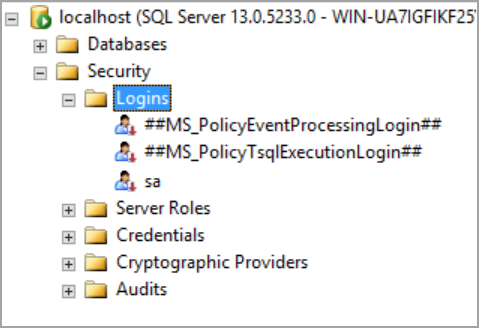
recover SA password by starting SQL Server in single user mode

I closed the connection and tried to connect the SQL Server instance using the same account which I used earlier. I am unable to log in as I deleted all the logins and the group [BUILTIN\Administrators] from which I gained access earlier. Please refer to the below image that shows login failure error.
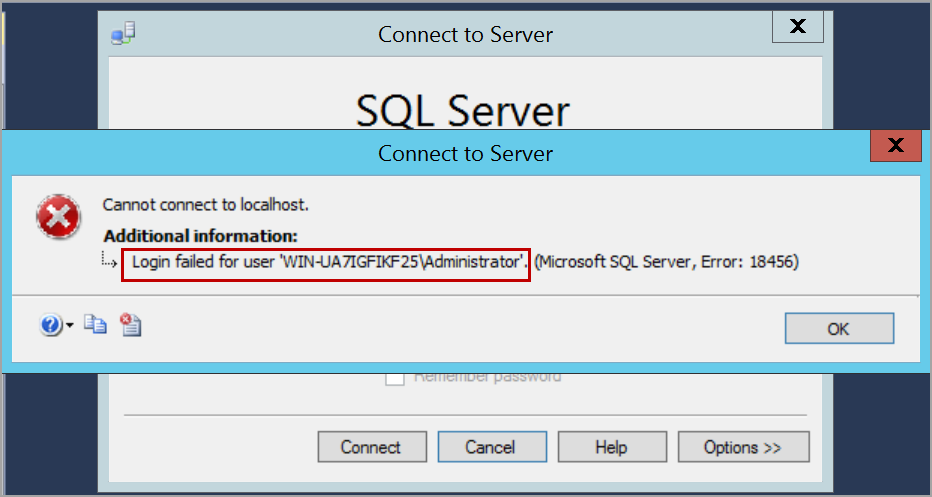
login failed.

Now, I’ve lost access to the SQL Server instance. I do not have any login that can connect to the SQL Server instance. I do not know the “sa” login password or even if the “sa” login is disabled.

In this situation, to gain access to your databases, we can re-install the SQL Server instance and attach the databases. This process may take more time and effort.

To gain access to the SQL Server instance back or recover SA password, please follow the below steps.

Start SQL Server in single user mode

We need to start SQL Server in single user mode by adding the parameter -m or –f in the startup parameters. Open SQL Server configuration manager and select the service of SQL Server instance. Right-click and click on the Properties option.
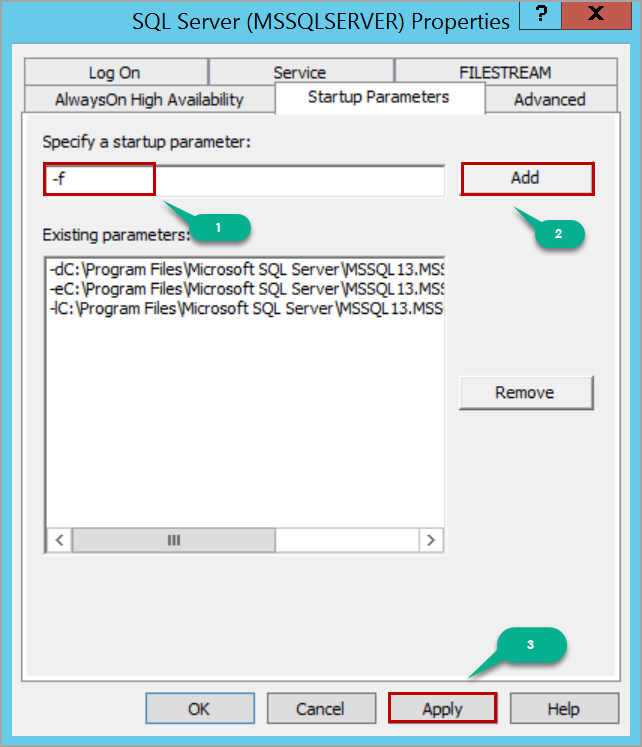
start up parameters to run SQL Server in single user mode

After adding the startup parameter, click on the Apply button and then the OK button in the warning message window.

Restart the SQL Server service to start SQL Server in single user mode. When the SQL Server is started in single user mode, all the users who are a member of the host’s local administrator group can connect to SQL Server instance and they will gain the privileges of server level role sysadmin which helps us to recover SA password.

So, if you are a member of the local administrator group, you can connect to SQL Server instance using SQLCMD or SQL Server Management Studio. In this case, I am using SQLCMD.

Launch the Command Prompt and connect to SQL Server using SQLCMD. You would be able to successfully connect to the SQL Server instance.
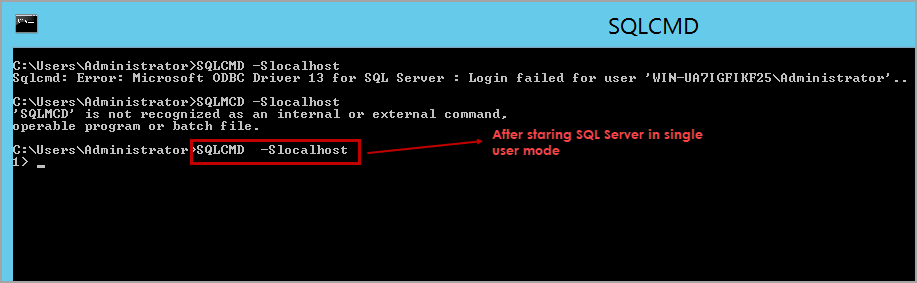
connect SQL Server using SQLCMD

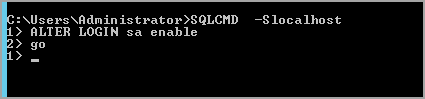
Now, if you know the password of “sa” login, just enable the “sa” login and start SQL Server in multi-user mode, connect to SQL Server instance using “sa” login and create whatever logins you need for your application to run.

Please refer to the below T-SQL script to enable “sa” login.

ALTER LOGIN sa enableGO
connect to SQL Server in single user mode to recover SA password

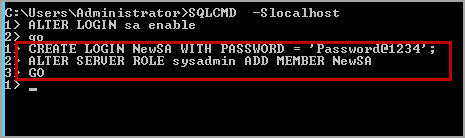
If you do not know the “sa” login password, create a SQL server login using the below T-SQL script.

CREATE LOGIN NewSA WITH PASSWORD = ‘Password@1234’;

Add the login NewSA to the server level role sysadmin. Please use the following T-SQL script to add the SQL Server login to the server level role sysadmin.

ALTER SERVER ROLE sysadmin ADD MEMBER NewSA GO
create sql server logins

Remove the startup parameter -m or -f that is added and restart the SQL Server services. Now, SQL Server instance is started in the multi-user mode and has the login that you created above. Please refer to the below image that shows the connection is established using NewSA login which is created above.
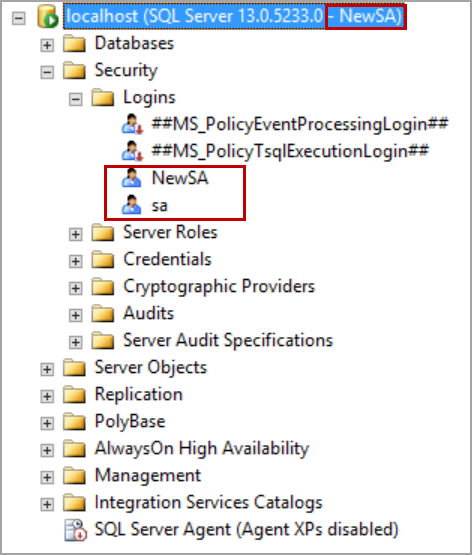
recover SA password

In some cases, you may have not enabled mixed-mode authentication (i.e. SQL Server and Windows authentication mode). In this situation even though we create a SQL Server login, it does not allow us to log in to SQL Server and throws login failed error.

Create a login from Windows account. Execute the following T-SQL script to create a Windows authentication login in SQL Server.

CREATE LOGIN [WIN-UA7IGFIKF25\rangach] FROM WINDOWSGO

Execute the following T-SQL script to add Windows authentication login to server level role sysadmin:

ALTER SERVER ROLE sysadmin ADD MEMBER [WIN-UA7IGFIKF25\rangach]GO

Replace the computer name and the login name with yours.
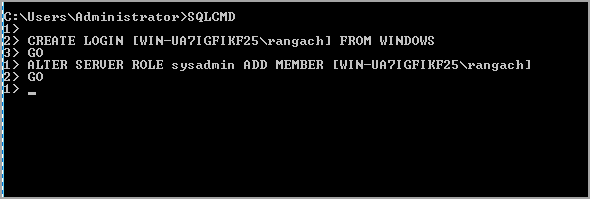
connect to SQL Server in single user mode from windows authentication

Remove the startup parameter and restart the SQL Server service. Log in to the computer with the same user as above.

Open SQL Server Management Studio and connect to the SQL Server instance using Windows authentication.
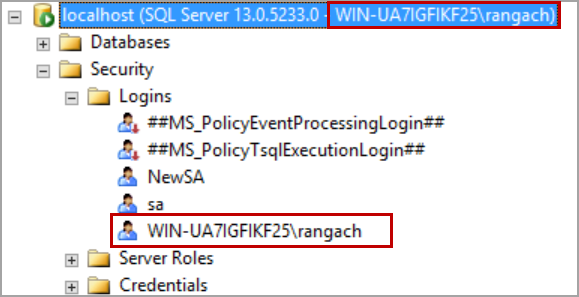
Recover SA password.connect SQL Server using windows authentication.

In case you want to create a login from Windows group, execute the following T-SQL script.

CREATE LOGIN [BUILTIN\Administrators] FROM WINDOWS
GO
ALTER SERVER ROLE sysadmin ADD MEMBER [BUILTIN\Administrators]
GO

CEH Module4 – Enumeration

Enumeration is the process of extracting usernames, machine names, network resources, shares, and services from a system or network. In the enumeration phase, an attacker creates active connections with the system and sends directed queries to gain more information about the target.

Target Information

  • Network resources
  • Network shares
  • Routing tables
  • Audit and service settings
  • SNMP and FQDN
  • Machine Names
  • Users and Groups
  • Applications and banners

Techniques for Enumeration

  • Extract usernames using email IDs
  • Extract information using default passwords
  • Brute force active directory
  • Extract information using DNS Zone transfer
  • Extract user groups
  • Extract usernames from SNMP

Services and Ports to Enumerate

DNS Zone TransferTCP/UDP 53
MS RPC Endpoint MapperTCP/UDP 135
NetBIOS Name ServiceUDP 137
NetBIOS Session ServiceTCP 139
SMB over TCPTCP 445
NFSTCP 2049
LDAPTCP/UDP 389
SNMPUDP 161
SMTPTCP 25
SNMP TrapTCP/UDP 162
IKE (Internet Key Exchange)UDP 500
SSHTCP 22
SIP (Session Initiation Protocol)TCP/UDP 5060
RPC port mapper serviceTCP/UDP 111
FTPTCP 21
Telnet TCP 23
TFTPUDP 69
Border Gateway ProtocolTCP 179
Printer TCP 9100

NetBIOS Enumeration : UDP 137, UDP 138, TCP 139

Attackers use NetBIOS enumeration to obtain the following:
– The list of computers that belong to a domain
– The list of shares on the individual hosts in a network
– Policies and passwords

nbstat Utility

nbtstat -a <ip address>
nbtstat -c

Tools

NetBIOS Enumerator – NetBIOS names, usernames, Domain names and MAC address
NMAP – nmap -sV -v –script nbstat.nse <target ip> – NetBIOS and MAC address
Others : Global Network Inventory, Advance IP scanner, Hyena, Nsauditor Network Security Auditor

Enumerating User Account

Enumerating user accounts using the PsTools suite helps to control and manage remote systems from the command line

Enumerating Shared Resources

Net View list of all the shared resources of a remote host or workgroup
– net view \\<computername>
– net view /domain:<domain name>

SNMP (Simple Network Management Protocol) Enumeration : UDP 161

  • SNMP consist of a manager and an agent. Agents are embedded on every network device, manager is installed on a separate computer
  • SNMP holds 2 password to access and configure SNMP agent from the management station
    – Read community string: Public
    – Read/Write community string: Private
  • Attackers use these default community strings to extract info
  • Can extract info of network resources, host, routers, devices and shares and network info like ARP tables, routing tables and traffic

Communication process between manager and agent

Management Information Base (MIB) info that can be retrieved

  • DHCP.MIB: Monitors network traffic between DHCP servers and remote hosts
  • HOSTMIB.MIB: Monitors and manages host resources
  • LNMIB2.MIB: Contains object types for workstation and server services
  • MIB_II.MIB: Manages TCP/IP-based Internet using a simple architecture and system
  • WINS.MIB: For the Windows Internet Name Service {WINS)
  • Manager X uses GetRequest to send a request for active session
  • Agent Y receives the msg and verifies if the community string is present on its MIB, checks request against list of access permissions and verifies the source IP
  • if agent does not find the community string or access permission Y MIB database, send authentication failure trap to trap destination Z
  • In Y the master agent component of the SNMP agent calls the appropriate extension agent to retrieve the requested session info from the MIB
  • In Y using info retrieved from extension agent, SNMP service forms a return message that contains the requested info and destination IP of SNMP manager X
  • Y sends the response to X

Tools

  • SnmpWalk – scan numerous SNMP nodes and identify a set of variables that are available for accessing the target network
  • NMAP – nmap -sU -p 161 –script=snmp-process <Target IP>, snmp-systdescr, snmp-win32-software
  • snmp-check – enumerate SNMP devices and output in a friendly formate
  • SoftPerfect Network Scanner – shared folders, any info of network devices via WMI, SNMP, HTTP, SSH and powershell
  • Others : Network Performance Monitor, OpUtils, PRTG Network Monitor, Engineer’s Toolset

LDAP Enumeration : TCP/UDP 389

  • Internet protocol for accessing distributed directory services
  • Directory services of organized set of records, hierarchical and logical structure
  • Client starts a LDAP session by connecting to directory system agent on port 389 and send a request
  • Info transmitted between client and server using basic encoding rules (BER)
  • info such as valid usernames, address and departmental details.

Manual LDAP Enumeration

  • Using python to fetch info

Automated LDAP Enumeration

  • NMAP ldap-brute force NSE script – nmap -p 389 –script-arg ldap.base=”…..” <Target IP>

Tools

  • Softerra LDAP Administrator – LDAP development, deployment and administration of directories
  • ldapsearch – enumerating AD users
  • Others : AD Explorer, LDAP Admin Tool

NTP and NFS Enumeration : UDP 123 , TCP 2049

  • NTP – network time protocol – synchronize clocks of networked computers
  • Attackers can gather info, list of connected hosts, clients IP address, names, OS, Internal IP if NTP server in DMZ

ntpdate -d <IP>

Tools

  • PRGT Network Monitor – SNTP (Simple Network time protocol) Sensor monitor
  • NMAP
  • Wireshark
  • UDP -Proto-scanner
  • NTP Server Scanner
  • NFS – Network File System – centralization of data
  • Attackers can gather into, exported directories, list of clients connected, IP address and shared data.

showmount -e <Target IP>

Tools

  • RPCScan – communicates with RPC services and checks misconfigurations of NFS shares – python3 rpc-scan.py <Target IP> –rpc
  • SuperEnum – script that does basic enumeration of any open port

SMTP and DNS Enumeration : TCP 25, TCP/UDP 53

  • SMTP 3 built in commands –
    VRFY – Validates users
    EXPN – Shows the actual delivery addresses of aliases and mailing lists
    RCPT TO- Defines the recipients of a message
  • SMTP servers respond differently to VRFY, EXPN, and RCPT TO commands for valid and invalid users, based on which we can determine valid users on the SMTP server
  • Attackers can directly interact with SMTP via the telnet prompt and collect a list of valid users on the SMTP server

Tools

  • NMAP – nmap -p 25 –script=smtp-enum-users <Target IP>
  • Metasploit – contains SMTP enumeration module, allow attackers to connect to the target SMTP server and enumerate usernames using a predefined wordlists
  • NetScan Tools Pro – email generator tool tests the process of sending an email via the SMTP server
  • smtp-user-enum – OS-level user account on Solaris via SMTP service, inspect responsed to VRFY, EXPN and RCPT TO command
  • DNS If the target DNS server allows zone transfers, then attackers use this technique to obtain DNS server names, hostnames, machine names, usernames, IP addresses, aliases, etc. assigned within a target domain

Tools

Linux DNS zone transfer using dig command – dig ns <target domain>
Windows DNS zone transfer using nslookup – nslookup, set querytype=soa, <target domain>
DNSRecon – checks aall NS records of the target domain for zone transfers.

DNS Cache Snooping – DNS cache snooping is a DNS enumeration technique whereby an attacker queries the DNS server for a specific cached DNS record

  • None-recursive Method – Attackers send a non-recursive query by setting a recursion desired bit in the query. dig @ <IP adddress of DNS> <Target domain> A +norecurse, NOERROR means accepted but not cached
  • Recursive Method – dig @ <IP adddress of DNS> <Target domain> A +recurse, a high TTL values means that the record is not in the cache

DNSSEC Zone Walking – DNS enumeration technique where an attacker attempts to obtain internal records of the DNS server if the DNS zone is not properly configured

Tools

  • Tools perform zone enumeration on NSEC and NSEC3 record files
  • LDNS – enumerates the DNSSEC zone and obtain results on the DNS records
  • DNSRecon – enumerating DNS records such as A, AAAA, and CNAME.
  • NMAP – nmap –script=boardcast-dns-service-discovery <Target Domain>
    namp -T4 -p 53 –script dns-brute <Target Domain>
    nmap -Pn -sU -p 53 –script=dns-recursion <target IP>
    nmap -sU -p 53 –script dns-nsec-enum –script-args dns-nsec-enum.domains=<target domain> <target IP>
  • Others : Knock, Raccoon, Subfinder, Turblistst3r

IPsec Enumeration : IKE UDP 500

  • IPsec provides data security by employing various components such as Encapsulating Security Payload (ESP), Authentication Header (AH), and Internet Key Exchange (IKE) to secure communication between VPN endpoints
  • Implemented technology for both gateway-to-gateway (LAN-to-LAN) and host-to-gateway (remote access) enterprise VPN solutions.
  • nmap -sU -p 500 <target IP>
  • ike-scan – discovering IKE hosts, fingerprint, transform enumeration, user enumeration, pre-shared key cracking

VoIP Enumeration : Session Initiation Protocol UDP/TCP 2000, 2001, 5060, 5061

  • VoIP gateway/servers, IP-PBX systems, client software, (softphones)/VolP phones, User-agent IP addresses, and user extensions
  • VoIP attacks, such as Denial-of-Service (DoS), Session Hijacking, Caller ID spoofing, eavesdropping, Spamming over Internet Telephony (SPIT), and VoIP phishing (Vishing)
  • svmap – identifies SIP and PBX servers on a target network.
  • Metasploit – SIP enumerator to scan numeric/extensions of VoIP phones

RPC Enumeration : Port Mapper Service TCP/UDP 111

  • RPC allow clients and servers to communicate in distributed client/server programs
  • Identify any vulnerable services on this service ports
  • nmap -A <Target IP 10.10.1.0/24>
  • NetScanPro Tools – port 111

Unix/Linux User Enumeration

  • rusers – displays a list of users who are logged on to the remote machines or machines on LAN
  • rwho – displays a list ofusers who are logged on to the LAN
  • finger – displays info about system users – login name, real name, terminal name, idle time, login time..

Telnet and SMB Enumeration : 23 / 445

  • Telnet – can access shared info, exploit identified vulnerabilities
    – nmap -p 23 <target IP>
  • SMB – OS banner grabbing
    – nmap -p 445 <target IP>
    – namp -p 445 –script smb-protocols <target IP>
    – namp -p 139 –script smb-protocols <target IP>

FTP / TFTP Enumeration: 21 / 69

  • FTP – usernames, password being exposed to attackers
  • nmap -p 21 <Target IP>
  • Metasploit, FTPbounce, FTP brute force and packet sniffing
  • TFTP is a simplified version of FTP used for transferring files between network devices
  • PortQry – reports port status of TCP / UDP ports on a selected target.
  • nmap -p 69 <Target IP>

IPv6 Enumeration

  • provides identification to computer systems
  • Enyx – fetches IPv67 address of a machine through SNMP
  • IPv6 Hackit – scanning tool that provides a list of active active IPv6 hosts. Can perform TCP port scanning and identify AAAA IPv6 host records

BGP Border Gateway Protocol Enumeration : 179

  • Used to exchange routing and reachability info between different autonomous systems
  • Nmap and BGP Toolkit to discover IPv4 prefixes announced by the AS number and routing path followed by the target
  • Subjected to Man-in-the-middle attack, BGP hijacking and DoS attack.
  • nmap -p 179 <Target IP>

Countermeasure

SNMP

  • Remove the SNMP agent or turn off the service
  • change defualt community string
  • implement GPO

LDAP

  • LDAP traffic insecure by default, use SSL or STARTTLS for encryption
  • username different from email address
  • use NTLM, kerberos or any basic authentication mechanism

NFS

  • Implement proper permission
  • FW rules
  • Ensure proper configuration of files /etc/smb.conf, /etc/exports, etc/hosts.allow
  • Log the requests to access the system files on the NFS server

SMTP

  • ignore emails to unknown recipient
  • exclude mail server and local host info in mail responses
  • disable open relay feature
  • limit the number of accepted connections to prevent brute force

SMB

  • disable SMB on Web and DNS servers
  • Disable tcp 139 and 445 used by the smb protocol
  • restrict anonymous access via windows registry

FTP

  • use SFTP or FTPS to encryption
  • implement strong passwords or cert-based authentication policy
  • not allow unrestricted uploading of file
  • disable anonymous FTP accounts

DNS

  • restrict resolver access
  • randomize source ports
  • audit DNS
  • patch know vulnerabilities
  • monitor nameservers
  • restrict DNS zone transfer
  • Separate resolver and authoritative nameserver
  • use isolated DNS servers
  • Disable DNS recursion
  • Harden OS
  • Use VPN
  • Implement 2FA
  • Use DNS change Lock
  • Use DNSSEC
  • Use premium DNS registration

CEH Module3 – Scanning Networks

Network scanning refers to a set of procedures used for identifying hosts, ports, and services in a network

  • To discover live hosts, IP address, and open ports of live hosts
  • To discover operating systems and system architecture
  • To discover services running on hosts
  • To discover vulnerabilities in live hosts

Types of Scanning

  • Port scanning – List open ports, services listening and OS.
  • Network Scanning – List active host and IP addresses
  • Vulnerability Scanning – Checking whether a system is exploitable by scanning for vulnerabilities

TCP Communication Flags

TCP Communication

Scanning Tools

  • NMAP – Active hosts, open ports, types of packet filters/firewall, OS and versions
  • Hping3 – Active hosts, packet crafting tool
  • Metasploit – provides Infra, content and tools to perform Pen test and extensive security auditing
  • NetScanTools Pro – List IPv4/6 address, hostnames, domain names and URLs
  • Others : sx, Unicornscan, PRGT Network Monitor, OmniPeek Network Protocol Analyzer
  • Mobile – IP scanner, Fing, Network Scanner
  • Ping Sweep – Angry IP Scanner – Active hosts and open ports
    Others : Solarwinds Engineer;s Toolset, NetscanTools Pro, Colasoft Ping Tool, Visual Ping Tester, OpUtils

Network Host Discovery Techniques

  • ARP Ping – nmap –sn -PR <Target IP>
  • UDP Ping – nmap –sn -PU <Target IP>
  • – ICMP ECHO Ping – nmap –sn -PE <Target IP>
  • – – ICMP ECHO SWEEP – nmap –sn -PE <IP range>
  • – ICMP Timestamp Period Ping – nmap –sn -PP <Target IP>
  • – ICMP Address Mask Ping – nmap –sn -PM <Target IP>
  • – TCP SYN Ping – nmap –sn -PS <Target IP>
  • – TCP ACK Ping – nmap –sn -PA <Target IP>
  • IP Protocol Ping – nmap –sn -PO <Target IP>

Port Discovery

Know the common ports

DNS Zone TransferTCP/UDP 53
MS RPC Endpoint MapperTCP/UDP 135
NetBIOS Name ServiceUDP 137
NetBIOS Session ServiceTCP 139
SMB over TCPTCP 445
NFSTCP 2049
LDAPTCP/UDP 389
SNMPUDP 161
SMTPTCP 25
SNMP TrapTCP/UDP 162
IKE (Internet Key Exchange)UDP 500
SSHTCP 22

Port Scanning Techniques

  • TCP Connect/Full Open (SYN) – nmap -sT -v <Target IP>
  • Stealth TCP Half-Open (SYN) – nmap -sS -v <Target IP>
  • — Inverse TCP Flag – nmap -sF,sN,sX -v <Target IP>
  • —- Xmas (FIN+URG+PSH) – nmap -sX -v <Target IP>
  • —- FIN (FIN) – nmap -sF -v <Target IP>
  • —- NULL (NULL)- nmap -sN -v <Target IP>
  • —- Maimon (FIN/ACK) – nmap -sM -v <Target IP>
  • ACK Flag Probe(ACK) – nmap -sA -v <Target IP>
  • —- TTL-Based (ACK)-nmap -sA -v -ttl 100 <Target IP>
  • —- Window-Based ACK Flag Probe(ACK) – nmap -sA -sW -v <Target IP>
  • — IDLE/IPID header (SYN)- nmap -Pn -p- -sl <zombie host IP> <Target IP>
  • UDP (UDP packet) – nmap -sU -v <Target IP>
  • — SCTP INIT(Init) – nmap -sY -v <Target IP>
  • — SCTP Cookie echo – nmap -sZ -v <Target IP>
  • – SSDP – Simple Service Discovery Protocol works with UPnP to detect plug and play devices, buffer overflow or DOS attack – Use Metasploit
  • List scan (List IP/Names without pinging, reverse DNS)- nmap -sL -v <Target IP>
  • – IPv6 – nmap -6 <Target IP>
  • Service Version Discovery – nmap -sV <Target IP>

Countermeasures

  • FW/IDS to detect and block probes
  • Port scanning tool to check FW detects ports scanning activities
  • Ensure routing and filtering cannot be bypassed
  • Router and IDS/FW latest releases
  • custom rule set / block unwanted ports
  • Filter all ICMP messages at FW/router
  • Perform TCP and UDP scanning against ICMP to check network configurations and available ports
  • Configure anti-scanning and anti-spoofing rules

OS Discovery (Banner Grabbing/OS Fingerprinting)

Active Banner Grabbing

  • Specially crafted packets, remote server response accordingly
  • Determine the OS
  • TCP/IP stack implementation

Passive Banner Grabbing

  • Banner grabbing from error messages
  • sniffing the network traffic
  • Banner grabbing from page extensions (TTL and Windows Size)

nmap -O <Target IP>
nmap -sC or –script smb-os-discovery <Target IP>

Countermeasures

  • Disabling or changing banner
  • Hiding file extensions from web pages

IDS/Firewall Evasion Techniques

  • Packet Fragmentation – splitting packet into several smaller packets, TCP header – nmap -sS -T4 -f -v <Target IP>
  • Source Routing – sending a route to the destination with a specified route in order to evade firewall/IDS
  • Source Port Manipulation – manipulating actual port number with common port numbers – namp -g 80 <Target IP>
  • IP Address Decoy – generating or manually specifying the IP addresses of decoys, appears that the decoys and the hosts are scanning the network – nmap -D RND:10 <Target IP>, nmap -D <decoyIPs> <Target IP>
  • IP Address Spoofing – changing the source IP address to appear to be coming from someone else, when victim replies, it goes back to the spoofed address. Hping3 xxx.com -a <spoofed address>
  • MAC Address Spoofing – spoofing MAC address with the MAC address of a legit user on the network- nmap -sT -Pn –spoof-mac 0 <Target IP>
  • Creating Custom Packets – Create and send custom packets to scan target behind IDS/FW – Colasoft Packet Builder, NetScanTools Pro
  • Randomizing Host Order – scan the number of host in the network in random order – nmap –randomize-host <Target IP>
  • Sending Bad Checksums – Send packets with bad/bugus TCP/UDP checksums – namp –badsum <Target IP>
  • Proxy Servers – Hide the actual source of the scan, Proxy chaining
    – user requests a resource from the destination
    – proxy client connected to a proxy server and passes the request the proxy server
    – proxy server strips the user info and passes to the next proxy server
    – repeat this process, until finally unencrypted request is passed to the websever
    Proxy Tools – Proxy switcher, CyberGhost VPN
  • Anonymizers – Removes all identity from the users computers, make activity untracable, access restricted content ,bypass IDS/FW
    – Networked Anonymizers – Transfer info through a network of computers before passing it to a website
    – Single-Point Anonymizers – Transfer info through a website before passing it on a website
    Anonymizer Tools – Whonix, Psiphon, TunnelBear, Invisible Internet Project, Orbot
  • Censorship Circumvention Tools – Alkasir (identified censored links) and Tails (partable OS)

IP spoofing Detection Techniques

Direct TTL Probes
– Send a packet to the host of the suspected spoofed packet that triggers a reply and compare the TTL with that of the suspected packet. if its different, its spoofed
– Works if the attacker is in a different subnet

IP Identification Number
– Send a probe to the host of the suspected spoofed traffic that triggers a reply and compare the IPID. if its not close in value, its spoofed
– Works if attacker is in a same subnet

TCP Flow Control Method
– Attackers sending spoofed TCP packet will not receive target SYN-ACK packets, attackers cannot response to a change to smaller congestion windows size. When received traffic continues after window size is exhausted, the packets are most likely spoofed

Countermeasure

  • Encrypt all the network tracffic
  • multiple firewalls
  • do not rely on IP based authentication
  • Use a random initial sequence number
  • Ingress Filtering – router/fw to filter incoming packets that appear to come from an internet IP address
  • Engress Filtering – filter all outgoing packets with invalid local IP address as a source

Scanning Detection and Prevention Tools

ExtraHop, splunk, scanlogd, vectra cognito detect, QRadar XDR, CYnet 360