
Step 1. If you have a Windows 10/server 2012/server 2016 installation disc in hand, then let’s continue. But if didn’t have a disc then you need to create a Windows 10 installation disc which can either be USB or CD/DVD first.
Step 2. Use this installation disc to boot your locked Windows 10 computer.
Step 3. Now as soon as the computer boots successfully, press “Shift + F10” to pop up the command prompt dialogue box.
Step 4. Execute the command given below to substitute utility manager with cmd and you must press “Enter” after every command in line.
move c:\of pc\windows\system32\utilman.exe c:\of pc\windows\system32\utilman.exe.bak
copy c:\of pc\windows\system32\cmd.exe c:\of pc\windows\system32\utilman.exe

Step 5. Eject the disk and restart your computer by typing the “wpeutil reboot” in the cmd dialogue box.
Step 6. So now when the computer arrives at the login page, click on the utility manager icon at the bottom right corner of the screen, and the cmd black box would open up instead.
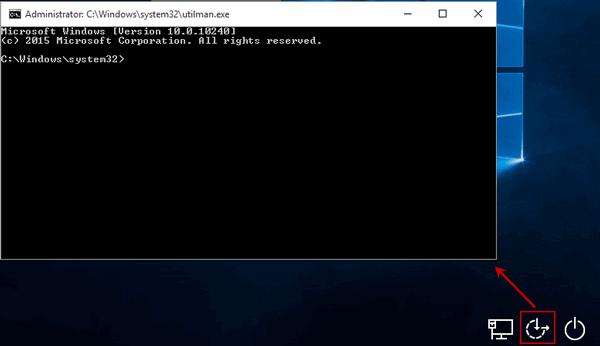
Step 7. Type the following command to create a new admin and hit “Enter” to reset a new password:
net user <username> <password>
Step 8. Restore the utility manager once again with the help of installation disc, and reboot your computer.
Step 9. Use the newly created password to sign in to your locked admin account.


 CY - Technical Memory extension